


ALL >> Computers >> View Article
Usb Safeguard 3.0 Protects Your Usb Pen Drive With A Password!



Misplacing the flash drive is a common occurrence due to its small size. The flash drive is portable and handy but losing important data may cost you a lot more than just inconvenience. The data you have backed up in your pen drive may be highly personal or important and you do not want them to fall into the wrong hands. To safeguard your private and confidential data from being leaked out when incidents like this happen, getting an encryption tool such as USB Safeguard can be a good idea.
USB Safeguard is a portable software program to encrypt and protect data with a password on your removable pen drive using the AES 256 bits encryption. USB Safeguard offers users (novice and expert) a friendly yet extremely powerful security solution that fully protects valuable data stored on USB pen drive. Also, has a useful feature that allows you to enter your email or phone if you lose the pen drive.
This portable program does not require any installation, once downloaded, just copy the file "usbsafeguard.exe" on the root of the pen drive and start it.
How ...
... it works:
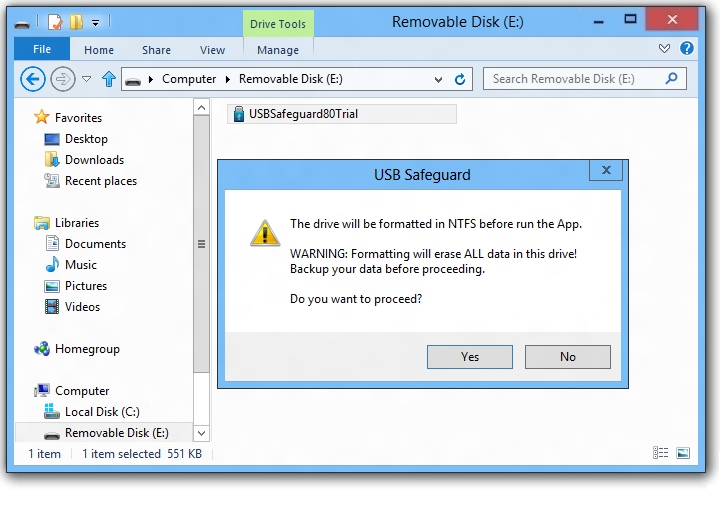
1. When you start it the first time, a message will appear asking you to initialize the pen drive, follow the istructions and press Yes to start the procedure (which takes less than a minute).
NOTE: The initialization procedure is only if your pen drive is not already FAT32 formatted.
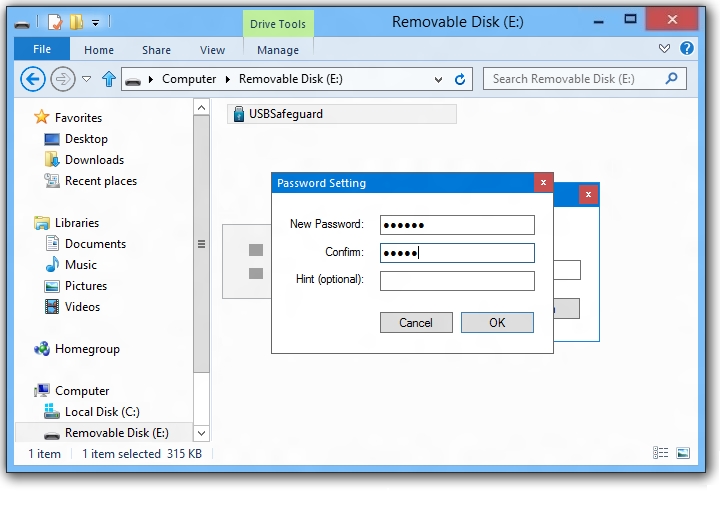
2. Set your password and press Lock button to lock the pen drive and protect files stored in it.
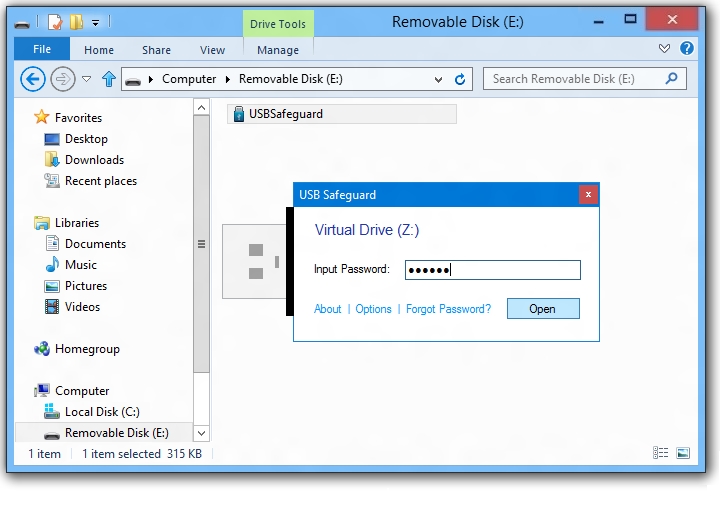
3. To unlock, launch the program from the pen drive. Type the password and press Unlock button.
4. Click on help icon (?) to set your contact details (email or phone) in case you loose your pen drive.

The software is easy to use and when you lock the pen drive, it's write protected and data are safe and hidden, also you can press ALT+K to open the Windows on-screen keyboard to type the password, this is particularly useful if you suspect that there is a keylogger installed on the computer you're using.
You can download USB Safeguard from www.usbsafeguard.com
Andrew Jordy is a collaborator of USB Safeguard, Soft.
Add Comment
Computers Articles
1. Spark Matrix™: Multi-carrier Parcel Management SolutionsAuthor: Umangp
2. Best Odoo Erp Software Company In Dubai For Business Growth
Author: Mayur Meheshwari
3. Top Challenges Faced By Equipment Rental Companies In The Uae — And How Erp Solves Them
Author: Al murooj solutions
4. Spark Matrix™: Intelligent Virtual Assistants (iva)
Author: Umangp
5. Pos Software Designed For Retail Operations
Author: EPOS Direct
6. Erp System That Reduces Stress And Improves Productivity
Author: Shalijah
7. Spark Matrix™: Global Service Parts Planning Application
Author: Umangp
8. Spark Matrix™: Enterprise Information Archiving
Author: Umangp
9. Textideo: Transforming Text Into Engaging Ai-powered Videos For Modern Creators
Author: Ethan Walker
10. Spark Matrix™: Enterprise Ai Search
Author: Umangp
11. What Identity Governance Really Means In Modern Enterprises
Author: Mansoor Alam
12. Strategies For Successful Site Selection In Clinical Trials
Author: Giselle Bates
13. Simplifying Business Purchases With Smart, Reliable Procurement Solutions
Author: suma
14. How Businesses In Dubai Are Scaling Faster With Modern Erp Software
Author: Al murooj solutions
15. How To Choose The Right Weapon Tracking System: 7 Must-have Features
Author: 3PL Insights