


ALL >> Automobiles >> View Article
How Can You Hide Likes On Your Instagram Profile?



In this era of social media, we consider how much someone is popular based on the likes they get on Instagram and Facebook posts. We can also say that likes are the new currency for teenagers. While the likes are a good feature for the influencers, who want to show off their likes. While it is not so with other normal people who don’t want to show off their likes. And the growing concerns of social media and these kinds of things affecting people’s mental health started surfacing, so in 2019 Instagram considered hiding the likes from the post-2019. Now, after 2 years, the feature is available for everyone to try. So, let’s give you a short and simple guide on how you can easily hide likes on Instagram.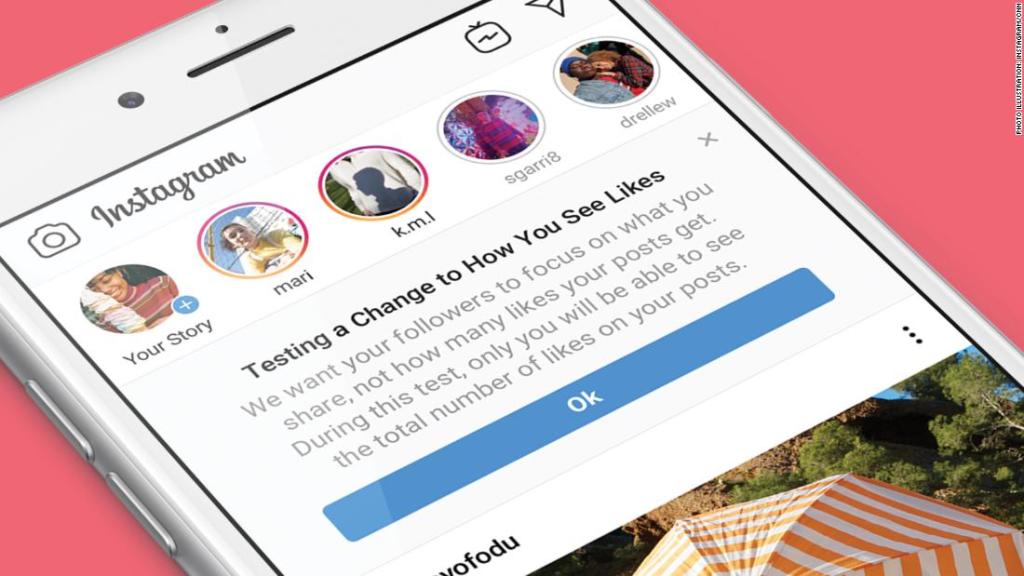 How to Hide Likes Count on Instagram:After using the new Hide likes option from Instagram, you can see a post in your Instagram feed without judging the post based on the number of likes the post has.Firstly, open your Instagram app on your Android or iPhone.Then ...
... tap on the Profile icon at the bottom.After that, tap on the horizontal lines at the upper right corner and then go to settings.Then navigate to Privacy > Posts.Here you will see the Hide-like and View Counts toggle.Then enable the toggle, and it’s done.Just like that, it is done, and from now on, you won’t see the number of likes and views on posts shared by other Instagram accounts. But does that disable the likes counts and views from your posts? No, it does not? So, here is how you can disable the likes and views on your posts also with ease. Just follow the steps given below, and it will be done.Firstly, open your Instagram app on your Android or iPhone.Then go to your profile menu.For now, you can see the number of posts and likes on a specific post.Then tap on the three-dot menu at the top, or you can say it advance option and then select hide the like count from your images.Note: Now, the person who is posting the image or video can still see how many likes and views. They have on their photo or video. But the number of hearts remains hidden from other users.How to Hide Likes Before Posting on Instagram:The tricks we have provided above are for existing posts only, but what if you want to do it before posting the picture. Don’t worry. Instagram also offers a way to hide like count before posting a picture on your feed.Go to the plus sign at the top of your Instagram feed and add a new post.When you finalize an image, then select it and add a filter to it. Then you can write a caption for the image as well as add location to it.On the same page, you will see an option of Advanced settings at the bottom in small font. Tap on it from the same menu.A new page will open in which you will see the option of Hiding like and view counts on this post in the first only. You have to enable that toggle.This how only you will be able to view the number of likes on a particular post. Others on Instagram will not be able to see it as it will be invisible to them.Sudden Change in Count FeatureInstagram has been observing the feature for a long time to make it comfortable for its users. The basic idea is to make Instagram less of a competition of likes and more of a platform where people can freely share things they want. On the other hand, the Hide Like Count is used to understand what is trending at the moment based on the number of likes.Conclusion:Instagram responded in a good way to social media depression by this feature. Now it’s up to the people and how they use this feature. Now you have a little about the kind of experience you want to have with your Instagram.Source:https://set2office.com/how-can-you-hide-likes-on-your-instagram-profile/
Add Comment
Automobiles Articles
1. Knowing About Harley Davidson Parts And Accessories - Oem Vs After-marketAuthor: Levi Fysh
2. What Is The Importance Of Seasonal Car Servicing And Repair Work?
Author: Oliver Mertin
3. Why Choose Manual Driving Lessons Over Automatic?
Author: Eleanor Thompson
4. Tips To Drive Safe - An Overview
Author: Eleanor Thompson
5. 5 Signs Your Car Needs Interior Sanitization Immediately
Author: autoglowind
6. New Mg4 Ev Deep Dive: Specs, Range, Charging, And The Real Numbers
Author: Panorica
7. Vinyl Wrap Vs. Colour Ppf: Which One Handles The Uae Sun?
Author: autoglowuae
8. Tyre Maintenance 101: Key Points You Should Note
Author: Olivia Robinson
9. Is Professional Car Polishing Better Than Waxing At Home?
Author: autoglowind
10. From Compliance To Competitive Advantage: Iatf 16949 + Automotive Qms Software
Author: Chirag Panjwani
11. Mobile Car Detailing & Valeting In London: Care Moving With The City
Author: MC Auto Detailing
12. Are You Planning To Purchase A Bobber? Here’s What You Need To Know!
Author: Levi Fysh
13. Get Authentic Repairing Services From A Trusted Provider Like Us
Author: Oliver Mertin
14. How Important The Initial Driving Lessons Really Are
Author: Eleanor Thompson
15. What Crucial Aspects Do You Need To Consider When You Get Enrolled For Driving Lessons?
Author: Eleanor Thompson